
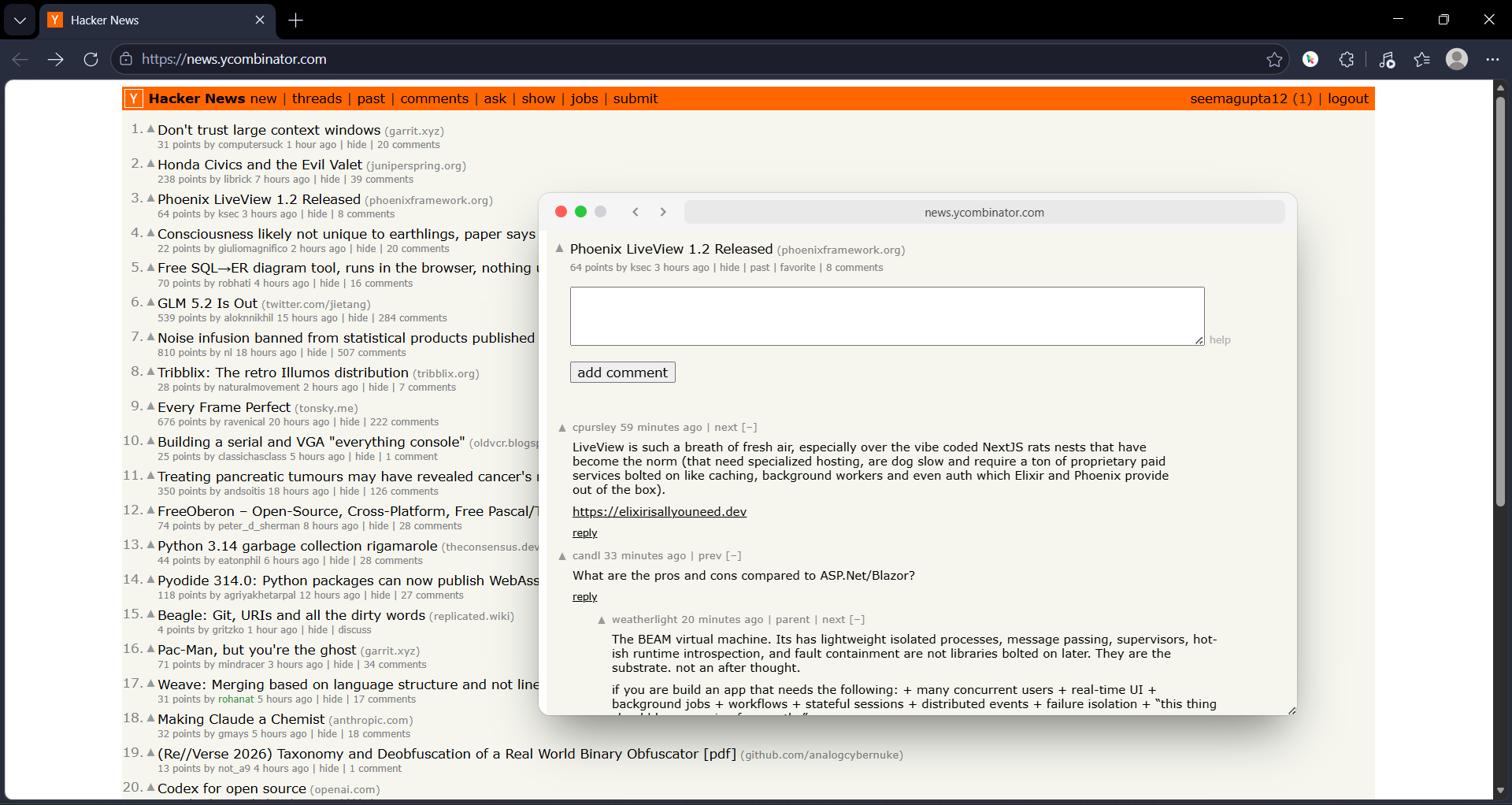
Here is how to read Hacker News without opening a single new tab.
The Hacker News Tab Problem
Let us be specific about what happens during a normal HN session.
You open the front page. You see a headline about a new Rust framework. You open it. New tab. You read the first paragraph. It mentions a GitHub repo. You open it. New tab. You scan the README. Someone in the comments links to a related blog post. You open it. New tab. You read the blog post. It links to a paper on arXiv. You open it. New tab.
You have not finished the front page. You have not opened the comments. You already have 4 tabs and you are 2 levels deep in a rabbit hole. You go back to HN. You see another headline. You open it. New tab. The cycle repeats.
By the end of a 20-minute HN session, you have 15 tabs. You remember 3 headlines. You have read none of the comment threads in depth. And your browser is using 3GB of RAM to maintain pages you glanced at for 10 seconds each.
The GoPeek HN Workflow
The fix is simple. Do not open links. Preview them with GoPeek.
Here is the exact workflow. It works on the front page, in comment threads, and in Ask HN posts.
Step 1: Scan the Front Page with Previews
You are on the HN front page. You see a headline that looks interesting. You hold Shift and hover the link (or long press it). A GoPeek preview opens instantly. You read the first few paragraphs. You decide in 10 seconds: worth reading or not.
If it is not worth reading, you close the preview. No tab was created. No context was lost. You are still on the front page. You move to the next headline.
If it is worth reading, you have two options. You can keep reading in the preview window — it is a full browser, you can scroll, click, and navigate. Or you can open it in a real tab if you know you want to spend 10 minutes on it. But 90% of HN links do not deserve a tab. They deserve a glance.
Front Page Scan: With vs. Without GoPeek
Without GoPeek: You open 8 articles in new tabs to "read later." You read 2 of them. The other 6 sit in your tab bar for 3 days. You close them in a guilt-fueled purge on Friday.
With GoPeek: You preview 8 articles. You read 2 in depth. The other 6 are closed in 10 seconds each. Zero tabs created. Zero guilt. Zero Friday purge.
Step 2: Read Comments Without Losing the Thread
HN comment threads are where the real value lives. But they are also where the real link density lives. A popular thread can have 200 comments, and 50 of them contain external links — to repos, papers, blog posts, and tools.
The normal workflow is painful. You see a comment linking to a GitHub repo. You open it in a new tab. You check the repo. You go back to the comments. You have lost your place. You scroll for 2 minutes to find the comment you were reading. You see another link. You open it. You go back. You have lost your place again.
With GoPeek, you hover the link in the comment. The preview opens. You check the repo. You close the preview. Your eyes are still on the same comment. You keep reading the thread. No scrolling. No searching. No lost context.
Comment Thread: With vs. Without GoPeek
Without GoPeek: You open 5 links from comments in new tabs. You check each one. You go back to the thread 5 times. You lose your place 5 times. You spend 8 minutes scrolling and 4 minutes actually reading. You give up on the thread.
With GoPeek: You preview 5 links from comments. You check each one. You close each preview. You never leave the thread. You read the entire discussion in 10 minutes. You know exactly which links were worth following and which were noise.
Step 3: Use Sidebar Mode for Deep Dives
Sometimes a comment thread or article is so dense with links that you need to reference multiple sources simultaneously. A thread about a new database might link to the repo, the documentation, a benchmark post, and a competing project.
Instead of opening 4 tabs and Alt-Tabbing between them, drag the GoPeek preview to the edge of your screen. It snaps into sidebar mode — a resizable split-screen panel. HN stays on the left. The preview stays on the right. You can scroll both independently. You can click links inside the preview and navigate without ever leaving the thread.
This is especially useful for Show HN posts, where the comments are full of feedback, bug reports, and feature requests that reference specific parts of the project. You can keep the project page visible in the sidebar while you read the feedback in the thread.
Step 4: Bubble-Minimize the Keepers
Occasionally you find a link you want to return to later in the session — a repo you want to star, a blog post you want to finish, a paper you want to download. You do not need to open a tab. You do not need to bookmark it immediately.
Double-click the GoPeek header. It collapses into a floating bubble — a small circle with the site's favicon that sits on your screen. It is not a tab. It is not in your tab bar. It is a visual reminder that you have something to revisit. When you are ready, click the bubble. It expands. You finish what you need to do. You close it.
At the end of your HN session, you close the remaining bubbles. No tab bankruptcy. No bookmark clutter. No guilt.
The Full HN Session: A Timeline
Here is what a 30-minute HN session looks like with and without GoPeek.
| Time | Without GoPeek | With GoPeek |
|---|---|---|
| 0:00 | Open HN front page | Open HN front page |
| 0:05 | Open article #1 in new tab | Preview article #1, read, close |
| 0:08 | Open repo link from article #1 | Preview repo, scan README, close |
| 0:12 | Back to HN. Open article #2. | Preview article #2, not interested, close |
| 0:15 | Open article #3. Open 2 links from it. | Preview article #3. Preview 2 links. Close all. |
| 0:20 | Enter comment thread #1. Open 3 links from comments. | Enter comment thread #1. Preview 3 links. Never leave thread. |
| 0:25 | Lost in tab bar. Cannot find comment thread. Spend 3 minutes searching. | Still in comment thread. Reading comment #47. Previewed 2 more links. |
| 0:30 | Session ends. 14 tabs open. 3GB RAM used. Remember 2 headlines. | Session ends. 0 tabs opened. 1 bubble minimized. Remember 8 headlines. |
Why This Matters for HN Specifically
Hacker News is not a normal website. It is a link aggregator with a comment culture that rewards deep linking. The front page is just the surface. The real content is in the threads, and the threads are full of external references.
Most websites have one or two links per page. HN has hundreds. And unlike a blog post where links are editorial and curated, HN links are conversational. They are dropped by strangers in the middle of arguments. You do not know if a link is a Rickroll, a dead repo, or a genuinely useful paper until you check it.
That means HN browsing is inherently speculative. You are not committing to every link. You are auditioning them. You need to glance at 10 repos to find the 2 that are worth starring. You need to skim 5 papers to find the 1 that is worth reading. You need to check 3 tools to find the 1 that solves your problem.
Browsers are not built for speculation. They are built for commitment. Every click is a new tab. Every new tab is a new process. Every new process is a new context switch. HN breaks this model by design. GoPeek fixes it by letting you treat links as glances instead of commitments.
The Minimal HN Stack
You do not need a complex setup. Here is the full stack for reading HN without tabs.
- GoPeek: Handle every external link without a tab switch. This is your primary reading layer.
- Old HN Redirect: The new HN design is slower and heavier. Force old.reddit.com-style old HN for speed. (Or use a userscript.)
- uBlock Origin Lite: HN does not have ads, but it has Y Combinator job postings that take up space if you are not looking for a job.
Three tools. That is it. GoPeek for link handling, old HN for speed, uBlock for cleanliness. You do not need tab groups. You do not need vertical tabs. You do not need session managers. You need fewer tabs.
The Bottom Line
Hacker News is one of the best sources of technical information on the internet. It is also one of the most hostile to focused reading. The site is designed to pull you deeper — more headlines, more comments, more links — and your browser is designed to let it. Every click is a trap door. Every tab is a debt.
You cannot change HN. But you can change how your browser handles it. GoPeek does not redesign the site. It changes the cost of engaging with it. Every link becomes a hover. Every repo becomes a glance. Every paper becomes a peek. Your tab bar never grows. Your RAM never spikes. And your focus stays on the thread instead of fracturing across 20 unrelated pages.
The next time you open Hacker News, try this. Hold Shift and hover the first headline. Read the preview. Close it. Move to the next one. Do this for 10 headlines. Then check your tab bar. It will have one tab — Hacker News. That is how you read 50 links without creating a single tab.